Eyefinity/surround support?
Posted: Fri Oct 04, 2013 11:14 am
Looked in the forums for something about running FTL on multiple monitors but came up with nada.
Basically, I went into the settings.ini and changed the resolution to my setup (4056x1024), but the results were disappointing. Well, look:
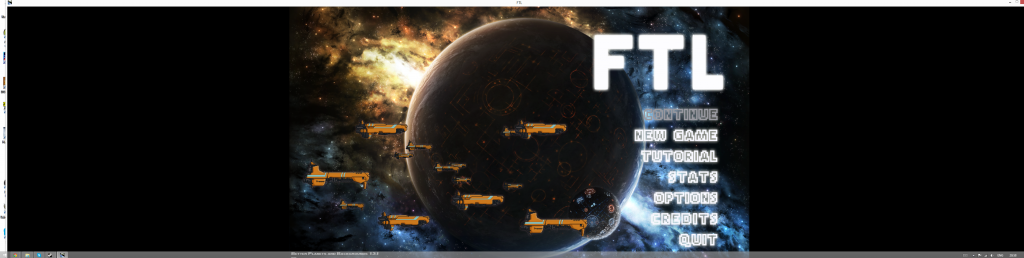
Sorry about the oversized image
Anyway, as you can see, it doesn't stretch the image across the entire window. Tried using stretched and non-stretched, windowed and not windowed. Nothing worked.
BUUTT. Big but here. (Heh, big butts)
https://www.youtube.com/watch?v=eY3Kn1fGGTI
If you skip to 2:57 you can clearly see FTL running in a multi-monitor setup. I asked how they did this but no response.
One interesting thing to note is he says his aspect ratio is nearly 4:3 where as mine... I have no idea what mine is but it is definatly not a square
So is there anyway to force FTL to run across three monitors? If you need anymore information, ask
EDIT: Apparently my aspect ratio is 507:128 which is quite far away from the 16:9 the game was designed for...
Basically, I went into the settings.ini and changed the resolution to my setup (4056x1024), but the results were disappointing. Well, look:
Sorry about the oversized image
Anyway, as you can see, it doesn't stretch the image across the entire window. Tried using stretched and non-stretched, windowed and not windowed. Nothing worked.
BUUTT. Big but here. (Heh, big butts)
https://www.youtube.com/watch?v=eY3Kn1fGGTI
If you skip to 2:57 you can clearly see FTL running in a multi-monitor setup. I asked how they did this but no response.
One interesting thing to note is he says his aspect ratio is nearly 4:3 where as mine... I have no idea what mine is but it is definatly not a square
So is there anyway to force FTL to run across three monitors? If you need anymore information, ask
EDIT: Apparently my aspect ratio is 507:128 which is quite far away from the 16:9 the game was designed for...
